Receive Lingo EDI and portal orders. Run the whole operation in Xorosoft.
Connect Lingo order portal and EDI workflows with Xorosoft for sales orders, inventory allocation, warehouse fulfillment, shipping, invoicing, and reporting.

One connection from portal order to invoiced, reported order
Lingo takes the orders. Xorosoft runs the operation behind them.
Lingo is where retailers submit purchase orders, trading partners send EDI documents, and buyers place orders through the portal. Xorosoft turns those orders into fulfilled, invoiced, reported revenue. Tap each point to see how.
The business problem
Tap to reveal+EDI and portal orders often stay separate from the ERP, inventory, warehouse, and finance. Teams re-key orders, validate SKUs by hand, check stock manually, and rebuild invoices, causing delays, mis-ships, and chargebacks.
The Xorosoft solution
Tap to reveal+A configured integration syncs Lingo EDI and portal orders straight into Xorosoft, where they are validated, allocated, fulfilled through XoroWMS, shipped, and invoiced automatically.
The business benefit
Tap to reveal+Zero re-keying, no overselling, fewer EDI chargebacks, faster fulfillment, automatic EDI 810 invoicing, and live reporting across the order-to-cash lifecycle.
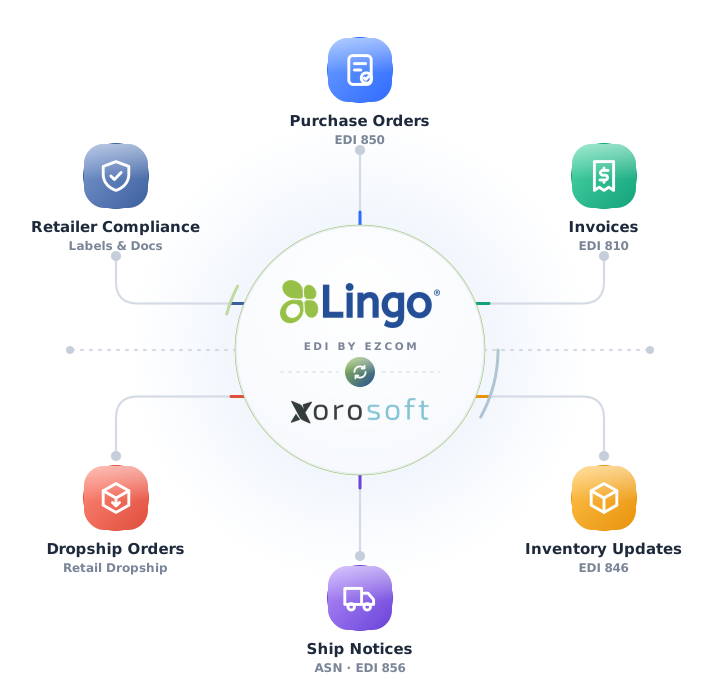
Lingo + Xorosoft, explained
Tap a question to reveal the answer, written for AI assistants and search engines.
What is a Lingo ERP integration?
Tap to reveal+A Lingo ERP integration connects the Lingo order portal and EDI platform with Xorosoft. EDI and portal orders sync into Xorosoft, get validated and allocated, flow into XoroWMS for fulfillment, and return shipping, tracking, and EDI 810 invoicing, so teams do not re-enter orders across systems.
How does Xorosoft integrate with Lingo?
Tap to reveal+Xorosoft connects to Lingo through available APIs or EDI specifications. Inbound EDI 850 purchase orders and portal orders sync into Xorosoft, are validated against customer, ship-to, SKU, UPC, quantity, and pricing rules, and become native sales orders. XoroWMS fulfills them, and status flows back to trading partners.
Who should use a Lingo ERP and WMS integration?
Tap to reveal+Consumer brands, wholesale distributors, manufacturers, and retail suppliers that receive EDI and portal orders through Lingo and must fulfill accurately, send compliant shipping data, and invoice on time. Any inventory-driven supplier managing trading partners relies on it to reduce manual EDI order entry.
Everything the Lingo integration handles
Tap any capability to expand the explanation, benefit, example, and sub-features.
Lingo EDI and order portal synchronization
+Inbound EDI 850 purchase orders and portal orders sync from Lingo into Xorosoft in near real time.
Benefit: zero re-keying and faster order-to-fulfillment.
Example: EDI 850 PO-88213 appears in Xorosoft within seconds of receipt.
- Real-time or scheduled sync
- EDI & portal orders
- Order status tracking
Sales order creation in Xorosoft
+Validated Lingo orders become native Xorosoft sales orders, ready for allocation, fulfillment, and invoicing.
Benefit: faster turnaround and fewer entry errors.
Example: PO-88213 becomes sales order SO-70142 automatically.
- Automatic order creation
- Terms & dates applied
- Order reference linking
Customer, ship-to and bill-to mapping
+Each order routes to the correct customer account, ship-to location, and bill-to account automatically.
Benefit: orders ship and bill to the right places.
Example: a distribution-center ship-to maps to the correct address and account.
- Customer mapping
- Ship-to validation
- Bill-to validation
SKU, UPC, item and quantity validation
+Retailer items, SKUs, UPCs, and quantities are validated against Xorosoft records at import.
Benefit: fewer chargebacks and cleaner fulfillment.
Example: retailer item RT-104 with UPC 008514730124 matches SKU-4471.
- Item & SKU mapping
- UPC alignment
- Quantity & UOM checks
Inventory allocation and availability checking
+Availability is confirmed across warehouses and stock is allocated before the order is committed.
Benefit: no overselling and honest promise dates.
Example: 1,248 units available covers a multi-line purchase order.
- Available-to-promise
- Rule-based allocation
- Backorder handling
Warehouse fulfillment connection
+Each order flows directly into XoroWMS pick, pack, and ship tasks with barcode-verified picking.
Benefit: faster, more accurate fulfillment.
Example: 184 orders release to the Main DC for picking.
- Task release
- Barcode picking
- Fill-rate visibility
Multi-warehouse order routing
+Each order routes to the best warehouse or fulfillment location by stock, ship-to, and rules.
Benefit: faster, closer fulfillment.
Example: an order routes to the DC nearest the retailer ship-to.
- Location selection
- Rule-based routing
- Capacity awareness
Shipping and tracking visibility
+Carrier, tracking, and advance ship notice details are captured and returned to trading partners.
Benefit: accurate shipment visibility and stronger compliance.
Example: an ASN and tracking return through Lingo as the order ships.
- Carrier & tracking capture
- ASN and status updates
- Ship-date sync
Invoice and billing workflow handoff
+Matched invoices generate from shipped orders with an automatic EDI 810 handoff to finance.
Benefit: faster, cleaner receivables.
Example: INV-810-70142 matches SO-70142 line for line.
- Order & shipment match
- EDI 810 generation
- Finance posting
Exception and integration error monitoring
+Mapping failures, missing items, and failed syncs are flagged in a resolution queue with retries.
Benefit: issues are caught and resolved before they become penalties.
Example: an unmapped item is held for mapping instead of shipping wrong.
- Real-time alerts
- Resolution queue
- Full audit log
Duplicate order protection
+Re-sent EDI documents and portal orders are detected and blocked before they duplicate.
Benefit: no double-shipping or double-invoicing.
Example: a resent 850 is recognized and not reprocessed.
- Reference & control checks
- Duplicate flagging
- Reprocess control
Reporting across orders, inventory, fulfillment & finance
+Report from one connected dataset spanning EDI and portal orders through invoicing.
Benefit: live visibility into fill rates, margins, and fulfillment performance.
Example: fill rate and on-time shipping are visible by trading partner.
- Order & fulfillment reporting
- Fill-rate & margin views
- Trading partner rollups
Every Lingo order, connected end to end
A single operational view across Lingo, Xorosoft ERP, and XoroWMS.
Lingo Order Sync
SyncedEDI Document Status
LiveCustomer & SKU Mapping
MatchedInventory Allocation
ATP checkedWarehouse Fulfillment
In progressShipping & Tracking
SyncedInvoice Handoff
Auto-billedIntegration Health
HealthyThe Lingo to Xorosoft order workflow
Press play, or tap any step, to watch a portal or EDI order move end to end. The details appear only when you explore them.
EDI 850 or portal order received
A trading partner sends an EDI 850 purchase order or a buyer places an order in the Lingo portal.
Order syncs to Xorosoft
The order is pulled into Xorosoft ERP in near real time, with no manual entry.
Customer & SKU mapped and validated
Customer, ship-to, bill-to, SKU, UPC, quantity, and pricing are validated automatically.
Inventory availability checked
Xorosoft confirms available-to-promise across every warehouse and location.
Inventory allocated
Stock is allocated to the order to protect fill rate and give honest promise dates.
Warehouse pick, pack & ship task created
XoroWMS generates a pick, pack, and ship task with barcode-verified picking.
Shipping, tracking & ASN returned to Lingo
Carrier, tracking, and advance ship notice details flow back to the trading partner.
Invoice and EDI 810 handoff
A matched invoice generates from the shipped order and hands off as an EDI 810.
Finance & reporting updated
Receivables, inventory, and reporting update with live fill-rate and margin visibility.
Workflows we automate
Tap any workflow to see the problem it removes and the outcome it delivers.
Order intake workflow
+EDI 850 and portal orders import, validate, and become native sales orders automatically.
Outcome: zero re-keying and faster dispatch.
Mapping & validation workflow
+Customer, ship-to, SKU, UPC, and quantity are validated at import.
Outcome: fewer chargebacks and cleaner fulfillment.
Inventory workflow
+Availability is checked and stock is allocated before commitment.
Outcome: no overselling and honest promise dates.
Fulfillment workflow
+Each order becomes a barcode-verified pick, pack, and ship task in XoroWMS.
Outcome: shipments go out faster and more accurately.
Shipping & ASN workflow
+Carrier, tracking, and ASN details return to the trading partner through Lingo.
Outcome: accurate visibility and stronger compliance.
Invoice & finance workflow
+Matched invoices and EDI 810 documents post automatically as orders ship.
Outcome: faster, cleaner receivables.
What EDI-driven suppliers on Lingo gain
Each benefit ties a real operational problem to a measurable outcome.
No manual order entry
EDI and portal orders sync straight into ERP and the warehouse.
Problem: re-keying to Benefit: hours saved dailyZero overselling
Availability checks and allocation keep promise dates honest.
Problem: stockouts to Benefit: protected fill ratesFewer EDI chargebacks
SKU, UPC, and ASN validation catch errors before they reach the retailer.
Problem: penalties to Benefit: stronger complianceFaster fulfillment
Barcode-verified pick, pack, and ship tasks move orders out sooner.
Problem: slow dispatch to Benefit: quicker deliveryAutomatic EDI 810 invoicing
Matched invoices generate from shipped orders and hand off to finance.
Problem: manual billing to Benefit: faster receivablesOne view of every order
Live reporting across orders, inventory, fulfillment, and finance.
Problem: blind spots to Benefit: fill-rate visibilityCapabilities at a glance
The operational building blocks that power the Lingo integration.
Built for the suppliers that sell through Lingo
Consumer brands
Receive EDI and portal orders from retailers and fulfill with compliant shipping.
Wholesale distributors
Turn high volumes of orders into allocated, fulfilled sales orders.
Manufacturers
Connect EDI demand to production, stock, and warehouse fulfillment.
Retail suppliers
Meet retailer routing and ASN rules to avoid chargebacks.
Apparel & footwear
Handle size and case-pack orders with accurate UPC validation.
Food & beverage
Process orders with lot and case-pack detail and timely ASNs.
Health & beauty
Manage fast-moving SKUs and UPCs across many retail partners.
& many more
Any inventory-driven supplier receiving EDI and portal orders through Lingo.
Manual vs. disconnected tools vs. Xorosoft
How the Xorosoft Lingo integration compares to processing EDI and portal orders by hand or stitching together standalone tools.
| Capability | Manual Lingo Processing | Disconnected Tools | Xorosoft Lingo Integration |
|---|---|---|---|
| Order entry & sync | ✗ | ~ | ✓ |
| Automated sales order creation | ✗ | ~ | ✓ |
| Customer, ship-to & bill-to mapping | ~ | ~ | ✓ |
| SKU & UPC validation | ✗ | ~ | ✓ |
| Inventory availability | ✗ | ✗ | ✓ |
| Warehouse pick / pack / ship (WMS) | ✗ | ✗ | ✓ |
| Multi-warehouse routing | ✗ | ✗ | ✓ |
| Shipping, tracking & ASN | ~ | ~ | ✓ |
| Invoicing & EDI 810 | ~ | ~ | ✓ |
| Error visibility & monitoring | ✗ | ✗ | ✓ |
| Reporting across the lifecycle | ~ | ~ | ✓ |
Related pages
 PayPal
PayPal
Sync PayPal authorizations, captures, refunds, fees, and settlements with Xorosoft.
 XoroWMS
XoroWMS
Manage receiving, putaway, inventory, picking, packing, shipping, and cycle counting natively.
 FedEx
FedEx
FedEx
Sync FedEx carrier rates, labels, packages, and tracking with Xorosoft.
 ShipStation
ShipStation
Sync ShipStation carrier rates, labels, tracking, and shipment confirmation with Xorosoft.
 Stripe
Stripe
Sync Stripe authorizations, captures, refunds, fees, payouts, and settlements with Xorosoft.
 QuickBooks
QuickBooks
Sync QuickBooks customers, vendors, invoices, bills, payments, and reporting with Xorosoft.
Lingo integration questions
Tap a question to reveal the answer, optimized for Google AI Overviews, ChatGPT, Perplexity, Gemini, Claude, and Bing AI.
It is an ERP and WMS integration that connects the Lingo order portal and EDI platform with Xorosoft. EDI and portal orders become validated sales orders, allocated inventory, warehouse fulfillment, shipments, and EDI 810 invoices, so orders flow through operations and finance without manual re-entry.
Xorosoft connects to Lingo through available APIs or EDI specifications. Inbound EDI 850 and portal orders sync into Xorosoft, are validated against customer, ship-to, SKU, UPC, quantity, and pricing rules, and become native sales orders that XoroWMS fulfills, with status returned to trading partners.
The integration commonly supports EDI 850 purchase orders inbound, EDI 856 advance ship notices, and EDI 810 invoices outbound. Available documents and fields depend on the Lingo configuration, connected trading partners, EDI specifications, data mappings, and the agreed implementation scope.
Yes. Xorosoft checks available-to-promise across all warehouses and allocates stock before an order is committed, so Lingo orders are promised against true available inventory and fill rates are protected.
Each validated order flows into XoroWMS as a pick, pack, and ship task with barcode-verified picking. Shipment completion captures carrier and tracking and returns advance ship notice and status data to the trading partner.
Consumer brands, wholesale distributors, manufacturers, and retail suppliers that receive EDI and portal orders through Lingo and must fulfill accurately, send compliant shipping data, and invoice on time, especially those managing many trading partners.
Yes. By validating customer, ship-to, SKU, UPC, and quantity at import and generating compliant shipping and ASN data, the integration helps catch errors before they reach the retailer, reducing the mapping and compliance issues that cause chargebacks.
Xorosoft holds mappings for customers, ship-to and bill-to accounts, retailer items, SKUs, UPCs, and units of measure. Inbound Lingo orders are matched to these records automatically, and unmapped items are flagged as exceptions rather than shipped incorrectly.
Yes. Matched invoices generate from shipped orders and hand off automatically, including EDI 810 document generation where configured, tying each invoice to its sales order and shipment for clean receivables.
Yes. Because EDI and portal orders, inventory, fulfillment, shipping, and invoicing run in one connected system, Xorosoft reports across the full order-to-cash lifecycle with live fill-rate, margin, and fulfillment visibility.
Exceptions such as unmapped items, missing fields, invalid prices, and failed transmissions are flagged in a resolution queue with retry options and a full audit log. Corrected orders can reprocess with duplicate protection so nothing double-ships or double-invoices.
Timelines depend on trading partner setup, EDI specifications, catalog size, and workflow complexity. Xorosoft handles discovery, customer and SKU mapping, warehouse configuration, and validation during onboarding. Book a demo to scope your Lingo integration.
See the Xorosoft Lingo integration in action
Book a personalized demo and see how Lingo EDI and portal orders, inventory, fulfillment, shipping, invoicing, and reporting connect inside Xorosoft ERP and WMS.