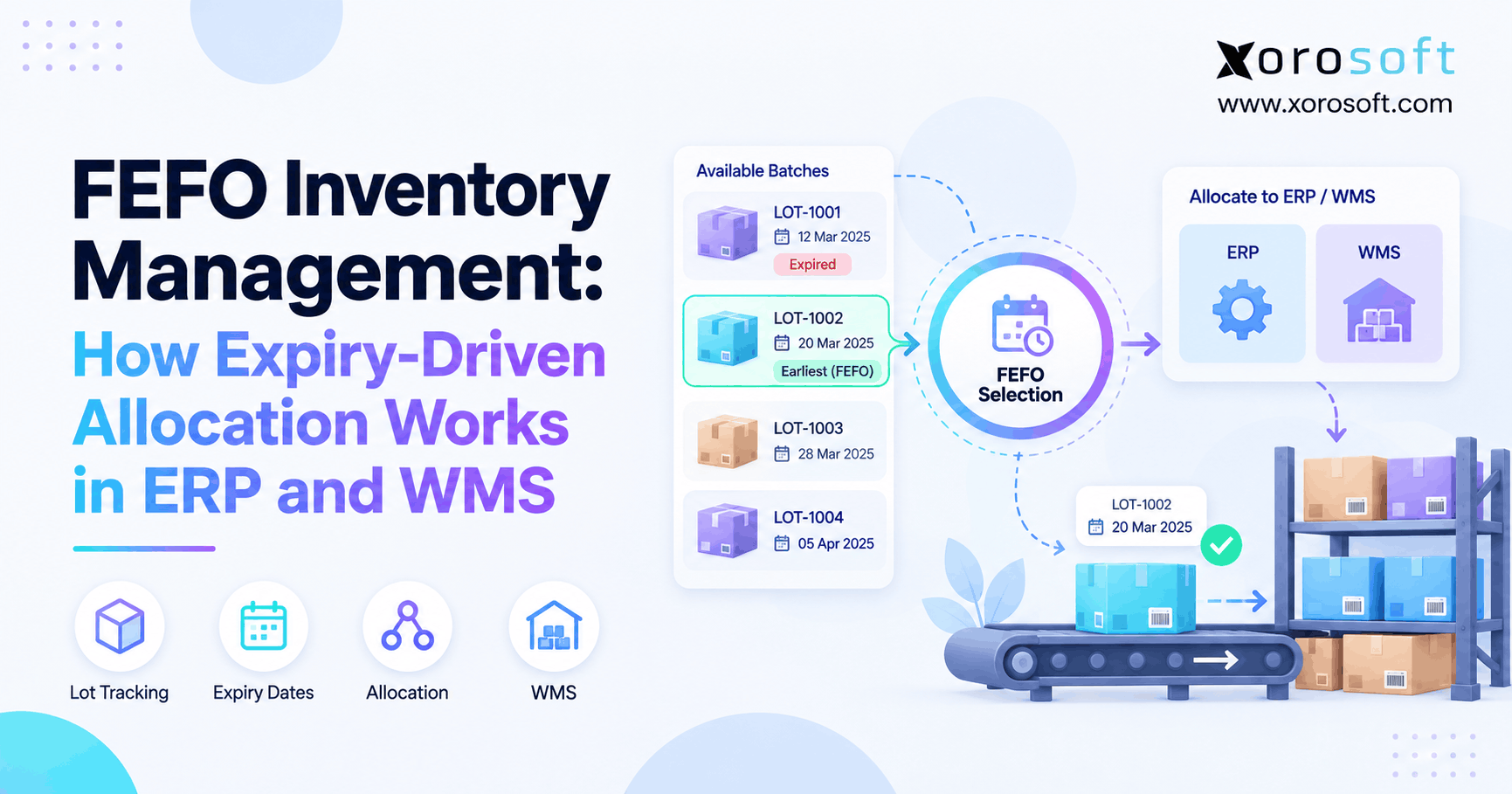
FEFO inventory management is a crucial system for businesses that want to optimise stock rotation and reduce waste.
1. Why the Earliest Expiring Lot Does Not Always Ship
FEFO inventory management helps teams ship the earliest-expiring stock that is still fit for a given order. Yet many warehouses pick a newer lot while older, usable stock stays on the shelf. As a result, a brand can report accurate stock counts and still lose money through waste, credits, and late shipments.
For example, a food distributor may have three batches of the same snack. One expires in 20 days, one in 50 days, and one in 90 days. At first, the 20-day lot looks like the right choice. However, if the customer needs 30 days of shelf life on delivery, that lot cannot meet the order rule.
Therefore, the real question is not simply, “Which lot expires first?” Instead, it is, “Which lot expires first among those allowed to ship?” This guide explains how ERP and warehouse management systems (WMS) can answer that question together.
1.1 The Gap Between Stock Counts and Stock Eligibility
A stock report may show 500 units on hand. However, 100 units may be on hold, 60 may be reserved, and another 80 may fail the buyer’s freshness rule. Therefore, the stock that can fill this order may be far lower than 500.
In addition, a web store may show a single stock number without showing which batches are suitable. As a result, order teams promise units that the warehouse later has to reject or replace. Clear lot rules close that gap before a picker reaches the shelf.
1.2 FEFO Inventory Management Starts With Eligibility
First, the system needs sound lot dates and stock status. Next, it must check customer and order rules. Then, it should rank eligible lots and reserve the right units. Finally, the warehouse must scan the actual lot and record what shipped.
Without those checks, FEFO inventory management becomes a report rather than an enforceable picking rule. Moreover, the cost of a wrong lot grows as businesses add more products, sales channels, and storage sites.
2. FEFO Inventory Management: Meaning, Uses, and Limits
FEFO stands for First Expired, First Out. In simple terms, the method gives priority to suitable stock with the nearest expiry or rule-based removal date. Therefore, a lot received last week may ship before one received last month if it expires sooner.
Still, the word suitable matters. FEFO inventory management should not tell teams to ship expired, damaged, or blocked goods just because those units carry the earliest date. Instead, the date only sets priority after the system checks whether the lot can be used.
2.1 First Expired First Out vs. FIFO
FIFO means First In, First Out. It usually selects older receipts first, while FEFO selects stock by relevant expiry order. For example, Lot A arrived in April and expires in December. Lot B arrived in May but expires in October. As long as both qualify, FIFO picks Lot A and FEFO picks Lot B.
| Rule | FIFO | FEFO |
|---|---|---|
| Main priority | Oldest receipt | Earliest eligible expiry |
| Core data | Receipt date | Lot and expiry date |
| Best suited to | General stock rotation | Goods with shelf-life risk |
| Main weakness | Can leave short-dated lots behind | Fails when dates or holds are wrong |
2.2 Picking Rules Are Not Costing Rules
FEFO guides the physical flow of goods. However, it is not a stand-alone method for valuing inventory in financial reports. For example, finance may follow an allowed cost method while staff pick goods by expiry date. Therefore, the ERP must keep the cost record and actual lot movement in sync without treating them as the same rule.
3. The Lot Data You Need Before Picking
Good FEFO inventory management starts at receiving, not when a sales order arrives. Therefore, each controlled item needs a trusted SKU, lot number, date field, quantity, storage site, and stock status. In addition, the team must know which date matters for that product and which fields the supplier must provide.
3.1 Expiry Dates, Best-Before Dates, and Removal Dates
An expiry date often marks an end-of-use point under the relevant product rules. In contrast, a best-before date often relates to expected quality. Meanwhile, a removal date can tell the warehouse when stock should leave before its final expiry.
For example, the Odoo FEFO removal guide explains how a removal date can be set ahead of expiration. Therefore, managers must agree on the driving date before they set the picking rule.
3.2 FEFO Inventory Management Starts at Receiving
First, staff scan or enter the lot code and the required date. Next, they match the record to the correct SKU, purchase receipt, and unit count. If quality checks are needed, they should hold the lot until staff approve it.
Also, standard barcode fields can help. The GS1 barcode guidance describes identifiers for lot numbers and date details. Still, labels vary, so receiving must handle missing or hard-to-read data rather than assume every scan is complete.
3.3 What to Do When a Date Is Missing
For items that require expiry control, an unknown date should trigger review. Otherwise, the system may rank the lot last, first, or as always valid without clear reason. Instead, staff should check the supplier record, correct the field, and release the stock only when the required data is known.
4. How FEFO Inventory Management Filters Eligible Lots
A lot can have the right date and still be wrong for a shipment. Therefore, the ERP should filter stock before it sorts the remaining lots. In FEFO inventory management, that filter often matters more than the date order itself.
4.1 Remove Holds, Damage, and Reserved Stock First
First, check that the lot belongs to the requested SKU and meets the unit or pack rule. Next, exclude damaged, recalled, or held stock. Then, subtract quantities already reserved for other orders. As a result, the system works from a pool of stock that is truly open for this order.
For example, 200 units on hand may include 40 units on a quality hold and 50 reserved units. Therefore, only 110 units remain for a new promise before any shelf-life check. Treating all 200 as sellable would create a false sense of stock cover.
4.2 FEFO Inventory Management and Shelf-Life Rules
Wholesale buyers may require a minimum number of days before a product expires. For example, a store may demand at least 30 days after the planned delivery date. Therefore, a lot that expires in 25 days may be fine for one order but not for that store.
The basic rule is simple: lot expiry date must be on or after delivery date plus required days. However, contracts may count dates in different ways. Therefore, set the rule once, test the boundary day, and use it the same way in each system. Microsoft’s shelf-life planning guide shows how buyer-specific sellable days can affect plans.
4.3 Decide Which Warehouse Can Meet the Promise
Even an eligible lot may be in the wrong place. For example, an earlier-expiring batch could sit three days away from a buyer who needs delivery tomorrow. Consequently, the ERP should also check the ship site, transit time, and transfer status. Otherwise, a date-only plan may improve stock rotation on paper while causing a late order.
5. How FEFO Inventory Management Allocates Lots in ERP
Once the eligible pool is known, the ERP can apply FEFO inventory management rules and rank lots by the chosen date field. However, correct FEFO inventory management also needs quantity checks, order rules, and a live record of each reservation. Without these steps, two open orders may both appear to own the same short-dated units.
5.1 FEFO Inventory Management: Rank Eligible Lots
First, sort lots by expiry or the set removal date, from earliest to latest. Next, use a clear tie-break rule if two lots have the same date. For example, the system might then use receipt order or a chosen lot code. Most importantly, it should never bring excluded stock back into the list just to fill the order.
5.2 FEFO Inventory Management Prevents Double Reservations
For example, an order needs 80 units and the first eligible lot holds only 50. If mixed lots are allowed, the ERP can reserve 50 from the first lot and 30 from the next one. Then, available stock must fall by the reserved amount. Otherwise, a later order may claim the same goods.
Moreover, a buyer may ask for one lot per order line. In that case, the system needs one valid lot with at least 80 units. Therefore, the earliest 50-unit lot cannot win, even though it expires first.
5.3 Recheck Reserved Lots When Orders Change
A reservation is not always final. For example, a new hold may block a lot after the sales order is saved. Likewise, a revised delivery date may make the lot too short-dated. Consequently, the team needs a safe way to recheck eligibility, change the pick task, and record the reason for the change.
In practice, the ERP-side sequence is filter → check freshness → rank → reserve → recheck if needed. Meanwhile, the WMS takes responsibility for confirming the physical lot that leaves the shelf.
6. A 60-Unit Order: Which Lots Actually Ship?
A worked example shows why FEFO inventory management requires more than expiry order. Suppose a food distributor has an order for 60 units due on November 3, 2026. The buyer requires 14 days of remaining shelf life at delivery. Therefore, for this example, lots must expire on or after November 17, 2026.
6.1 Compare the Lots Against the Same Rule
The order allows mixed lots, and every quantity is in one warehouse. However, some units have other limits. As a result, the earliest dates are not always valid choices.
| Lot | Units | Expiry | Stock status | FEFO result |
|---|---|---|---|---|
| A | 60 | Nov 10, 2026 | Released | Reject: too short-dated |
| B | 25 | Nov 18, 2026 | On quality hold | Reject: not released |
| C | 40 | Nov 21, 2026 | Released | Reserve 40 |
| D | 80 | Dec 5, 2026 | Released | Reserve 20 |
| E | 100 | Not recorded | Review required | Reject until checked |
6.2 FEFO Inventory Management Picks Lots C and D
First, Lot A fails the 14-day rule, even though it expires before every other dated lot. Next, Lot B meets the date check but fails the quality check. Then, Lot C supplies its 40 eligible units. Finally, Lot D provides the 20 units needed to finish the order.
Therefore, the correct reservation is 40 units from Lot C plus 20 units from Lot D. The total is 60 units, and Lot D retains 60 unreserved units. Most importantly, the decision can be explained from the order rule and lot records rather than a picker’s guess.
6.3 What Changes Under a Single-Lot Rule?
Now assume the buyer requires all 60 units from one lot. Since Lot C has only 40, it cannot meet the full order alone. Therefore, the system would choose 60 eligible units from Lot D, assuming no other limits apply. As a result, a valid FEFO outcome changes when the order rule changes.
Also, if the expected delivery date moves later, the freshness check must run again. Otherwise, a lot reserved last week could fail the buyer’s rule by the time it arrives.
7. FEFO Inventory Management in Warehouse Picking
An ERP plan for FEFO inventory management has value only if the warehouse follows it. Therefore, the WMS must turn the reserved lot into a clear pick task and verify what the worker takes. This is where FEFO stock rotation moves from a screen into a carton.
7.1 FEFO Inventory Management at Receiving and Putaway
At receiving, staff should record the lot code, count, date, and stock state. Next, putaway should keep the lot easy to find and scan. If goods need a quality check, the WMS should help keep them apart from released stock. Otherwise, an early-expiring but blocked lot could look like the quickest pick.
7.2 Directed Picks and Barcode Checks
Once the ERP reserves a lot, the WMS can guide staff to the right bin and quantity. Then, barcode checks can compare the scanned item and lot with the task. For example, XoroWMS supports barcode-led warehouse work, stock tracking, and picking controls. However, buyers should test the exact expiry and hold rules used in their own workflow.
7.3 FEFO Inventory Management and Wrong-Lot Scans
Suppose a worker scans Lot D while the task calls for Lot C. In that case, the system should flag the mismatch rather than quietly accept it. Next, a lead can check whether Lot C is missing, blocked, or misplaced. If a change is allowed, the team should approve it and update the order record.
Finally, shipment confirmation should store the lot that actually left the building. As a result, customer service and quality teams can find the right buyers if a later product issue occurs.
8. FEFO Inventory Management: Common Failure Points
Even well-designed FEFO inventory management rules fail when real stock does not match system records. Therefore, teams need daily checks for date changes, stock holds, returns, and pick overrides. Otherwise, FEFO inventory management may look strong in reports while workers rely on manual fixes.
8.1 Wrong Dates and Out-of-Date Lot Records
For example, a supplier may send a new date for part of a batch after receiving is complete. If staff update a spreadsheet but not the ERP, the WMS may still use the old date. Therefore, use one clear change path, store the reason, and check which open orders may need a new lot.
8.2 FEFO Inventory Management Exceptions: Holds and Returns
Returned goods should not flow straight back into sellable stock. Instead, staff should confirm the lot, check its state, and decide whether it can be sold again. Likewise, held stock needs a clear release step. Otherwise, an old lot may appear eligible before quality staff finish their work.
8.3 Uncontrolled Overrides During Picking
A worker may find an empty bin and take stock from a nearby shelf. However, that nearby lot may fail the buyer’s rule. Therefore, wrong-lot scans need a clear response, such as a count check, reassignment, or approved pick change. In addition, teams should review override logs to spot training or data problems.
ERP readiness check: If your team cannot explain why a lot was picked, which rules it met, and who approved a change, it may be time to review how stock data moves between order and warehouse systems.
9. FEFO Inventory Management Across Multiple Warehouses
As companies add storage sites, FEFO inventory management becomes more than a date check. For example, a short-dated lot may sit in a distant warehouse while the buyer needs delivery the next day. Therefore, the system must check whether each site can meet the promised ship and arrival dates.
9.1 Check Warehouse Availability for Each Order
A lot may be on hand but not able to ship today. For instance, it could be in transit, in a bin that is not open for picking, or reserved for another order. Consequently, the ERP should show open-to-sell units by site and lot. In addition, the WMS should confirm where those units are stored.
9.2 When Transfers Change Expiry Priority
Transfers can help a team sell short-dated stock at a site with stronger demand. However, transit time also uses part of the remaining shelf life. Therefore, teams should weigh freight time, transfer cost, and buyer needs before moving a batch. For example, shifting a lot with only two days left may create more risk than value.
10. How Ecommerce, Wholesale, and EDI Affect Allocation
Shopify, Amazon, and wholesale orders can draw on the same product stock. Yet each channel may need different lot rules. Therefore, FEFO inventory management must connect channel-facing stock numbers to the lots a warehouse can actually ship.
10.1 FEFO Inventory Management for Shopify Orders
An online store may show 100 units available for a SKU. However, that number does not tell a buyer which lot will ship or how fresh it will be. Consequently, the ERP or connected stock system should use the right sellable quantity and pass accurate order details to fulfillment.
Xorosoft brings ecommerce, stock, warehouse, and finance work into one cloud ERP environment through XoroONE. In addition, merchants can review its Shopify App Store listing when assessing fit. Still, the live test should show how the planned setup treats short-dated and blocked lots.
10.2 Customer Shelf-Life Rules and EDI Orders
Retail buyers may set a minimum freshness window or require one batch per line. Therefore, the order system needs to capture those terms before stock is reserved. Likewise, EDI and manual B2B orders must follow the same lot rule for the same buyer. Otherwise, a change in order source could lead to a different shipment result.
10.3 Keep Channel and Warehouse Records in Sync
For example, when a lot goes on hold, the change should affect order decisions before staff promise its units. In turn, a shipment should reduce the correct physical lot and channel-facing stock. Xorosoft’s integrations can be part of a connected commerce stack, although each business should confirm how its specific sync rules and order flow are set.
11. Which Industries Need Date-Driven Stock Rotation?
FEFO inventory management is most useful when time changes whether a product is fit for sale or use. However, not every SKU needs the same rule. Therefore, firms should choose the stock method by product group and risk, not force one policy across the whole catalog.
11.1 FEFO Stock Rotation for Food and Beverage
Food and drink firms often manage fresh dates, lot holds, and retailer shelf-life rules. For example, a drink may still be usable but fail a store’s 90-day requirement. Therefore, batch data must stay linked to purchasing, stock, and outbound orders.
Xorosoft describes batch and expiry tracking for food and drink firms among the industries it serves. Still, teams should test the exact mix of date rules, quality steps, and trace records their products need.
11.2 Cosmetics, Wellness, and Lot Control
Beauty and wellness products may carry batch dates and customer freshness needs. In addition, some products may need strict storage or quality steps. Therefore, a picking plan should check both time and stock state. Otherwise, a valid date could hide a damaged pack or a held lot.
11.3 First Expired First Out for Manufacturing Materials
A factory may need to use an eligible ingredient lot before it grows too old. Consequently, work orders should record which batch went into each finished lot. Also, planners should avoid ordering more dated inputs than demand can use. As a result, the business can reduce slow stock while keeping clearer lot records.
11.4 When FIFO or Simple Rotation Is Enough
Durable furniture and other goods without a meaningful use-by date may not gain much from FEFO. Instead, FIFO or bin-based picking may be simpler. Therefore, start with the products where age affects quality, buyer terms, or safe use, and leave low-risk items on an easier rule.
12. Implementing FEFO Inventory Management Step by Step
A sound rollout does not start with the pick screen. First, teams need clean data and agreed rules. Next, they should test how the ERP and WMS deal with both normal orders and hard cases. Finally, they can expand after the first site proves the process works.
12.1 Set FEFO Inventory Management Rules by Customer
Choose which SKUs need expiry control. Then, define the date field, required lot data, hold status, and minimum shelf-life rules. For example, a wholesale order may need 30 days after arrival, while direct sales may follow a different approved rule. Also, decide whether the boundary day counts and whether mixed lots are allowed.
12.2 Clean Existing Lot Records Before the Pilot
Next, review on-hand lots and check for blank dates, wrong codes, duplicate records, and unknown stock status. If a date cannot be trusted, set the stock aside for review. Otherwise, the pilot may seem to fail because of old data rather than the new workflow.
12.3 Test FEFO Inventory Management in Allocation and Picking
Use sample orders with lots that expire in different months. Then, add a quality hold, a missing date, a short shelf-life limit, and a single-lot request. Also, scan the wrong lot on purpose to see whether the WMS flags it. Finally, change the delivery date and check whether the selected batch still qualifies.
12.4 Train Teams and Expand by Warehouse
Start with one site or one group of products. Meanwhile, train receiving, order staff, pickers, and team leads on the same rule. Then, review error logs and fix weak spots before adding new locations. As a result, FEFO inventory management can grow without forcing a risky all-at-once switch.
13. Metrics That Reveal Hidden Expiry Costs
FEFO inventory management should improve decisions, not just add another system field. Therefore, the team needs clear measures for wrong lots, near-expiry stock, and write-offs. In addition, those measures should separate pick errors from poor buying or demand plans.
13.1 FEFO Inventory Management: Pick Accuracy and Overrides
Track how often picks match the approved rule. Also, log every wrong-lot scan and approved change. For example, a high number of overrides at one site may point to missing stock or weak bin labels. Therefore, managers should look at the cause instead of treating all changes as worker mistakes.
| Measure | Simple method | What it shows |
|---|---|---|
| FEFO pick match rate | Correct evaluated picks / all evaluated picks × 100 | Rule use |
| Wrong-lot scan rate | Wrong-lot scans / lot-controlled picks × 100 | Pick control gaps |
| Near-expiry stock | Units or value within a set date window | Stock at risk |
| Expiry write-offs | Value removed because of expiry | Loss from dated stock |
13.2 Link Expiry Exposure to Buying and Forecasts
A perfect pick rule cannot sell goods that no one wants. Therefore, also track demand, open purchase orders, and lots nearing expiry. For instance, a large inbound order might bring more units than the market can use before the best-before date. In that case, better purchasing or demand plans may matter more than picking speed.
14. Choosing ERP and WMS Software for FEFO
Software buyers assessing FEFO inventory management should ask for a full lot-to-shipment test. Although a product may store expiry dates, that does not prove it can apply every customer rule at reservation and picking. Therefore, ask the vendor to show the precise workflow your business needs.
14.1 FEFO Inventory Management Features Worth Testing
First, test date capture at receiving and the way the system treats blank values. Next, place a lot on quality hold and confirm it does not win allocation. Then, change a buyer’s shelf-life rule. Also, test mixed lots, a single-lot order, and a wrong-lot scan. Finally, check the record of the lot that shipped and the reason for any override.
14.2 How Xorosoft Fits an Integrated Workflow
For inventory-driven firms, Xorosoft connects inventory, order flow, buying, accounting, and warehouse work in one ERP family. Its XoroERP platform supports core business and warehouse tasks. However, buyers should confirm the exact FEFO setup and rule checks needed for their goods, sites, and customers before making a choice.
14.3 What a Useful Demo Should Prove
A strong demo should start with a receipt and end with a verified shipment. For example, ask the provider to process the 60-unit order shown above, block Lot B, and show why Lot C wins. Then, change the order to one lot only and see if the system picks Lot D. As a result, the team judges real behavior, not feature names on a slide.
15. When to Move Beyond Spreadsheets and Manual Picks
FEFO inventory management can start with manual checks when a firm holds a few dated SKUs in one site. However, errors grow as order volume and rule count rise. Therefore, the choice to upgrade should follow real problems rather than a set company size.
15.1 When FEFO Inventory Management Outgrows Spreadsheets
Look for repeat stock holds that do not reach the order desk, frequent date edits, and pickers who choose lots from memory. Also, note orders changed at the dock because the reserved lot is too short-dated. If teams must compare several sheets before every big order, the workflow is already using time that better data could save.
15.2 Start With the Biggest Control Gap
Sometimes the fix is not a new ERP. Instead, a firm may need better labels, clear hold rules, or a tighter WMS link. However, when stock, orders, buying, and finance all use different data, an integrated system may make more sense. Therefore, map the weak points before setting the scope of a software project.
15.3 Validate FEFO Inventory Management in a Live Demo
Bring one hard order, one blocked lot, and one date rule into a vendor session. Then, ask the team to show the full flow in the live system. Finally, review the audit trail and the final lot record. This test makes a software choice more grounded than a broad claim of “full FEFO support.”
16. Conclusion: FEFO Inventory Management Needs Clear Rules
FEFO inventory management works when each order receives the earliest-expiring eligible stock, not merely the earliest date in the system. Therefore, clean lot data, clear buyer rules, and sound reservation logic must work together. Just as importantly, warehouse scans must confirm which lot actually shipped.
As product lines and sites grow, manual checks can become harder to trust. However, software alone is not the answer unless it can enforce your real workflow. To review how your team manages lot dates, holds, and warehouse picks, Book a Demo and use one real shipment as your test case.
Frequently Asked Questions
What is FEFO inventory management?
FEFO inventory management means shipping the earliest-expiring eligible lot first. However, a lot must also pass stock, quality, and customer checks. Therefore, the shortest date alone never guarantees the lot should ship.
What is the difference between FIFO and FEFO?
FIFO uses receipt order, while FEFO uses expiry or removal dates. For example, FEFO may ship a later receipt first if it expires sooner. However, the selected lot must still meet order rules.
How does an ERP choose a FEFO lot?
First, the ERP checks open stock, lot status, and shelf-life rules. Next, it ranks eligible lots by date. Then, it reserves enough units and updates the order record.
Can FEFO use stock that is on quality hold?
No. A held lot should stay out of the eligible pool until staff release it. Therefore, the system should pick another valid lot or flag the order for review.
How do minimum shelf-life rules affect FEFO?
A customer may need a set number of days remaining at delivery. Therefore, a lot can be unexpired but still fail the order. The ERP should check this before ranking lots.
Does Shopify automatically enforce FEFO rules?
Do not assume it does. Shopify may show stock by item and site, while lot-level picking depends on the linked systems and setup. Therefore, verify the full order-to-shipment process.
What should buyers test in FEFO ERP and WMS software?
Test an expiry limit, quality hold, mixed-lot order, and wrong-lot scan. Then, confirm that the final shipment record shows the actual lot and each approved change.
Recent Posts
-
 Ecommerce Delivery Statistics 2026: Cost, Speed, and Promise Accuracy
-
 How to Calculate Inventory Turnover by Channel, Warehouse and SKU
-
 ERP for Importers Managing Partial, Rejected, and Canceled Receipts
-
 Shopify B2B vs Wholesale Portal Software for Complex Accounts
-
 What Is Nonconforming Inventory and How Should ERP Control It?