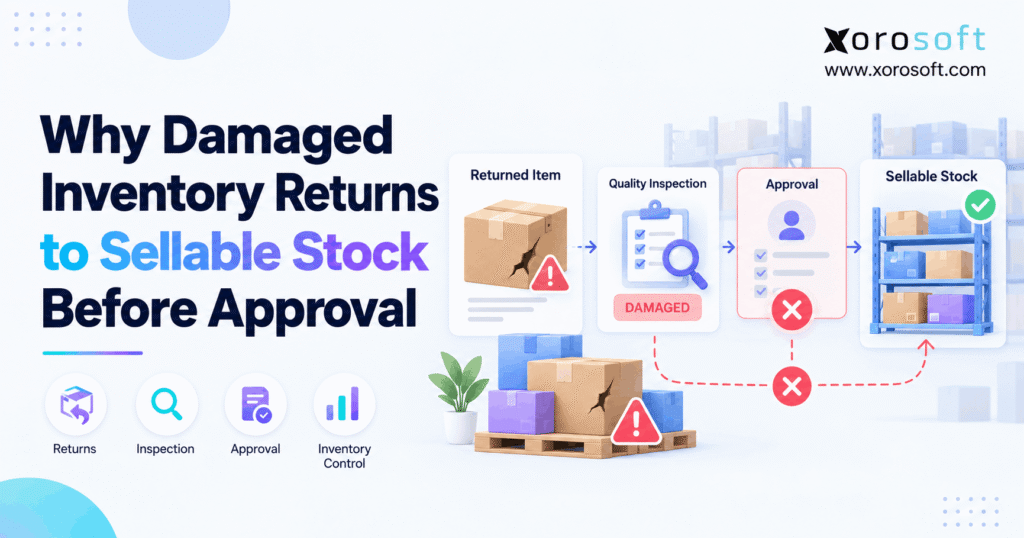
If you are dealing with damaged inventory restocking, understanding the process is crucial for efficient operations.
1. The Damaged Return That Went Live Before Anyone Approved It
Damaged inventory restocking becomes a serious problem when a returned product appears as sellable before the warehouse has inspected or approved it. As a result, an item sitting in a damaged-goods bin can be promised to another customer. Worse, the inventory dashboard may appear correct because the physical unit really did come back.
However, physically receiving a product does not prove it is fit for resale. Likewise, issuing a refund confirms a financial decision, not the item’s condition. Therefore, an accurate returns process must separate those events instead of treating them as one inventory update.
1.1. The Approval Gap Behind Damaged Returns
First, a customer requests a return. Next, a warehouse receives the package and records a quantity. Meanwhile, customer service may issue a refund, while a connected application updates ecommerce availability. If inspection happens afterward, the sales channel can display stock that has never passed a quality check.
Consequently, the central problem is not always an incorrect count. Instead, it is an incorrect inventory state: the returned item exists, but it should not yet be available for picking or purchase.
1.2. What This Guide Will Help You Fix
This guide explains why damaged inventory restocking bypasses approval, how to find the responsible transaction, and which controls prevent the same problem from recurring. In addition, it covers Shopify-specific return behavior, ERP and WMS responsibilities, accounting consequences, and practical checks for multi-warehouse operations.
Most importantly, the solution does not automatically require new software. Rather, it requires a clear rule: only an authorized release should move a returned item into sellable inventory.
2. Why Damaged Inventory Restocking Is an Approval Problem
2.1. Return Authorization Is Not Restock Approval
A return merchandise authorization, or RMA, confirms what the customer is permitted to send back. However, an RMA usually begins before the product arrives, so it cannot establish its actual condition. For example, a buyer may report that a jacket is unworn, while the inspection team later discovers damage.
Therefore, return approval should control the customer-facing process, not determine whether the unit can be resold. Similarly, refund authorization should not release inventory merely because a customer’s credit has been approved.
2.2. Damaged Returns: Why Receiving and Inspection Differ
Receiving answers a narrow question: which items and quantities arrived? By contrast, inspection asks whether those items meet the business’s resale criteria. As a result, the warehouse may need to record ten physically received units while keeping all ten unavailable pending a quality decision.
For instance, one package can contain an approved SKU, an incorrect replacement, and a visibly damaged item. Consequently, damaged inventory restocking should never classify everything inside a returned carton as equally sellable.
2.3. Sellable Stock Requires a Separate Decision
Finally, inventory release converts a verified condition decision into usable stock. Accordingly, the release should identify the SKU, quantity, location, disposition, approver, and time. Without that evidence, a company cannot easily explain why a specific returned unit became eligible for an order.
In practice, damaged stock release controls should prevent customer service, routine receiving scans, and integration retries from bypassing warehouse quality approval. That boundary is the foundation of trustworthy return-to-stock processing.
3. Seven Causes of Premature Damaged-Stock Release
3.1. Refund Options Trigger Damaged Inventory Restocking
Sometimes, an employee processes a refund and accepts a restock selection without checking whether the product has arrived. Consequently, the inventory count can rise before the return is inspected. Even when the action is permitted by the application, it may violate the warehouse’s resale policy.
Therefore, train refund operators to confirm whether the item should be restocked, held, or handled separately. In addition, audit refund-related adjustments whenever sellable quantity increases before a receiving event.
3.2. Receiving Scans Post Directly to Sellable Stock
Another common cause is a receiving location mapped to regular warehouse stock. For example, an employee scans a damaged chair into the system, and the receiving transaction immediately increases available units. Meanwhile, the chair is still waiting at a returns bench.
Instead, receive uninspected merchandise into a dedicated unavailable status or staging location. As a result, the count can reflect the physical receipt without exposing the product to new orders.
3.3. Missing Quality Results Allow Damaged Stock Release
A digital inspection checklist is not useful if operators can leave it blank and continue. Similarly, a default disposition of ‘restock’ may hide incomplete condition checks. Consequently, the application needs a fail-closed rule for products that require inspection.
Specifically, damaged inventory restocking must pause when photographs, required condition grades, or safety checks are missing. Only a recorded passing result or approved exception should permit inventory release.
3.4. Too Many Users Can Approve Their Own Returns
When receivers can both identify damage and override holds, the intended separation of duties disappears. For instance, a rushed employee may mark an item sellable to clear a queue. Later, management cannot distinguish an authorized exception from an accidental override.
Therefore, reserve sensitive release permissions for trained approvers. In addition, require reason codes and retain the original inspection result whenever an exception changes stock status.
3.5. Integrations Can Trigger Premature Inventory Release
A returns app may send a ‘received’ event to an ERP or storefront. However, if the receiving system interprets the message as ‘ready to sell,’ damaged inventory restocking can occur automatically. Similarly, a delayed integration may overwrite an unavailable status with an older quantity.
Accordingly, define the exact meaning of each event. Furthermore, keep one authoritative owner for sellable availability and reject duplicate or out-of-order stock changes whenever possible.
3.6. Damaged Stock Status Mapping Can Fail
One system may label inventory ‘QC hold,’ while another stores it as ordinary on-hand quantity. Consequently, a connector that exports total on-hand as available can publish damaged units to Shopify, Amazon, or another channel. The interface may report successful synchronization even though the business rule is wrong.
Therefore, test every status mapping, not just total quantity matching. In particular, verify that inspection, quarantine, repair, and scrap quantities remain excluded from sellable inventory.
3.7. Damaged Returns Are Released at the Wrong Warehouse
Multi-location errors add another layer. For example, a 3PL receives a damaged unit at its returns facility, but a connector increases availability at the primary distribution center. As a result, the storefront promises stock from a location that never received an approved item.
Instead, use location-specific receiving, holds, and release records. Likewise, confirm that inter-warehouse transfers do not automatically convert quarantined units to sellable stock.
| Failure | What to check first | Corrective control |
|---|---|---|
| Refund restock selected | Refund and inventory adjustment timestamps | Separate refund from inventory release |
| Direct-to-sellable receipt | Receiving destination and status | Unavailable returns staging |
| Missing inspection | Required condition fields | Mandatory quality result |
| Broad staff permissions | Release user and reason | Restricted approval roles |
| Integration mapping error | Source event and stock-state mapping | Explicit state contract |
| Duplicate event | RMA and message identifiers | Duplicate-event protection |
| Wrong location | Receiving and selling locations | Location-based release rules |
4. Inventory States That Keep Damaged Returns Unavailable
4.1. On-Hand Stock Does Not Equal Sellable Stock
On-hand inventory describes units recorded at a location. However, some units may be committed, damaged, or held for review. Therefore, on-hand and available-to-sell quantities should not be treated as interchangeable.
For Shopify merchants, the official inventory states documentation explains Available, Committed, Unavailable, On hand, and Incoming quantities. Notably, Unavailable includes stock reserved for reasons such as damage or quality control. Consequently, a product can remain physically on hand without being available to shoppers.
4.2. Use a Clear Returned Stock Approval Matrix
Before designing an automation, define which inventory states your team will use. For example, a returned unit can move through ‘Received – Inspection Pending,’ ‘Quality Hold,’ ‘Damaged,’ or ‘Approved Sellable.’ Meanwhile, repairable products may require a separate repair queue and reinspection.
| State | Physical stock recorded? | Can a new order use it? | Required next action |
|---|---|---|---|
| Received, awaiting inspection | Yes | No | Inspect and classify |
| Quarantined | Yes | No | Investigate or inspect |
| Damaged / repair | Usually yes | No | Repair, vendor return, or scrap |
| Approved sellable | Yes | Yes, if otherwise eligible | Put away or allocate |
| Scrapped / disposed | Removed from usable inventory | No | Record disposal and finance adjustment |
Importantly, these are recommended operating categories, not identical labels in every ERP. A damaged inventory restocking policy should specify which states permit authorized release. Therefore, adapt the names to your actual software while keeping the underlying release rules consistent.
4.3. Inventory Quarantine Should Not Create New Units
A status transfer should move an existing quantity from one eligibility category to another. In contrast, a quantity addition changes how many physical units the system records. Confusing these operations can produce both false availability and incorrect inventory valuation.
Consequently, damaged inventory restocking audits should check whether the transaction was a status transfer, a receipt, or a new inventory adjustment. The correction depends on which one occurred.
5. Example: Twelve Returns, Four Damaged Units, One Bad Update
5.1. How Damaged Inventory Restocking Inflates Availability
Consider a hypothetical sporting goods distributor that receives 12 customer returns of the same SKU. After inspection, eight items pass, but four fail because of visible damage or faulty components. However, the receiving app has already posted all 12 units into sellable stock.
As a result, the system reports four additional sellable units that should still be blocked. If customers order those units, the warehouse may face canceled picks, delayed shipments, or repeat returns. Meanwhile, its inventory dashboard may appear balanced because all 12 physical units are present.
| Processing step | Incorrect workflow | Controlled workflow |
|---|---|---|
| Return received | +12 sellable | +12 inspection hold |
| Inspection result | 8 pass, 4 fail | 8 pass, 4 fail |
| Authorized release | Not required | Release 8 passing units |
| Increase in sellable quantity | +12 | +8 |
| Incorrectly available units | 4 | 0 |
Illustrative example only; these are not documented customer results.
5.2. Which Restock Approval Should Have Stopped the Error?
The blocking event should occur after receipt and before release to available-to-sell inventory. Specifically, the warehouse must approve the eight passing units while keeping the four failures unavailable. Therefore, no refund, scan, or synchronization message should independently release all 12 units.
Additionally, a later correction should not simply reduce the physical count by four if those units still exist. Instead, move them to an appropriate damaged or quarantine state and reconcile the earlier transaction.
5.3. Why the Same Error Becomes More Expensive at Scale
At one warehouse, a supervisor may notice the issue before shipment. However, across three warehouses and several sales channels, the incorrect quantity can spread through allocation rules and automated order routing. Consequently, staff may chase different stock figures while the original condition failure remains unresolved.
For this reason, damaged inventory restocking needs a transaction-level approval rule, not just an end-of-day adjustment spreadsheet.
6. How to Stop Damaged Inventory Restocking Before Approval
6.1. Inventory Quarantine Starts at Receiving
First, match the parcel to an RMA, order, SKU, and expected quantity. Next, scan the physically received units into returns staging rather than normal pick locations. Then, assign an unavailable status until the required checks are finished.
As a result, the warehouse retains a reliable record of the physical receipt without making an unsupported promise to shoppers. Furthermore, discrepancies such as missing accessories, wrong SKUs, or extra units remain visible for investigation.
6.2. Damaged Returns Need Condition-Based Release Rules
Next, define what ‘resellable’ means for each product category. For apparel, the checklist might cover wear, stains, tags, and accessories. However, sporting goods or electronic products may need a functional test, while regulated or safety-sensitive products may require stricter procedures.
Therefore, damaged inventory restocking should depend on a completed condition result rather than a generic received status. In addition, require supervisor approval for failed inspections, disputed dispositions, and high-risk product categories.
6.3. Make Quarantine and Damaged Inventory Restocking Traceable
A strong workflow records the original order, RMA, SKU, serial or lot number where relevant, receiving location, inspection result, disposition, approving user, and release timestamp. As a result, teams can reconstruct the exact decision that changed availability.
For instance, XoroWMS return management from Xorosoft describes barcode receiving, inspection, quarantine, repair, scrap, and vendor-return dispositions. Accordingly, these are useful capabilities to evaluate when replacing unstructured returns processes.
6.4. Keep Refunds Independent From Stock Release
A refund may be justified even when an item is lost, destroyed, or impossible to resell. Therefore, finance and customer service should not need to mark a product sellable to close the customer case. Instead, each team should complete its own event and share the evidence needed by the next team.
Recommended policy: A returned unit remains unavailable until an authorized condition-based disposition explicitly releases it. Consequently, no receiving confirmation, refund, or integration event can substitute for that release.
7. Shopify Returns: Refund Actions Versus Inventory Approval
7.1. Why Shopify Refunds Need Restock Approval
Shopify’s refund documentation explains that its direct refund flow includes a ‘Restock items’ selection that is checked by default for tracked products. Therefore, an operator who refunds an item must review whether restocking is appropriate. Otherwise, the financial action can also create an unwanted inventory movement.
However, this does not mean Shopify always automatically restocks every return. In particular, Shopify’s formal returns workflow offers an optional ‘Restock at’ choice during return processing after receipt and inspection. Accordingly, the correct control depends on the specific Shopify workflow the team uses.
7.2. How to Keep Damaged Inventory Restocking Out of Shopify Availability
First, use the proper unavailable inventory state for products that require a hold. Next, confirm the warehouse or integration does not publish damaged units as Available. In addition, test whether moving a unit between statuses causes an unexpected quantity increase.
For Shopify-connected brands, an integrated ERP can be the operational system behind ecommerce inventory. However, the release ownership and status mapping must be defined in the actual configuration; a connection alone does not guarantee that every business rule is enforced.
7.3. Test Partial Returns, Multi-Location Returns, and App Retries
Before rolling out a change, test a refund before arrival, a partial return with mixed conditions, and a returned unit received at a non-fulfillment location. Then, replay a duplicate integration event where the test environment allows it.
Finally, confirm that damaged inventory restocking occurs only for approved units at the correct Shopify location. Otherwise, damaged inventory restocking may reappear after the next software update or workflow change.
8. How to Audit an Unauthorized Restock Transaction
8.1. Find the First Premature Inventory Release Event
Start with an affected SKU, order, and RMA. Next, record the timestamps for refund, return receipt, inspection, disposition, approval, and ecommerce inventory adjustment. Importantly, identify the earliest event that increased the sellable count, not just the most recent corrective entry.
Shopify’s inventory adjustment history can help show quantity movements and the users or apps associated with adjustments. Therefore, use it alongside WMS and ERP transaction logs to establish who or what changed availability.
8.2. Check Permissions, State Mapping, and Duplicate Messages
Next, ask whether the initiating user had release permission, whether inspection was completed, and whether the status mapping was correct. Likewise, check that the same return was not posted twice by separate applications. If a stock sync occurred after a valid quarantine entry, investigate whether it overwrote that state.
Consequently, damaged inventory restocking incidents should be classified by root cause rather than corrected with an unexplained manual adjustment. That classification makes recurring failures easier to prevent.
8.3. Keep an Evidence Trail for Each Correction
For every incident, record the RMA, SKU, affected location, quantity, incorrect event, underlying cause, and corrective transaction. Additionally, capture the reviewer and any customer orders affected by the error. Then, retest the exact workflow that produced the damaged inventory restocking incident.
As a result, a manager can distinguish a durable fix from a one-time inventory cleanup. Moreover, the same record can support finance reconciliation and future process audits.
9. Where ERP, WMS, and Ecommerce Systems Should Enforce Release
9.1. Assign One Owner for Sellable Stock Release
A storefront publishes sellable quantities, but it may not be the best place to determine product condition. Meanwhile, a WMS manages physical receiving, inspections, bins, and pick eligibility. An ERP may connect those decisions to customer orders, accounting, and purchasing.
Therefore, the system design should identify one authoritative release event. For example, the warehouse can record an approved disposition, while an inventory service or ERP publishes the resulting available quantity to sales channels.
9.2. Enforce Holds Across Picking, Allocation, and Channels
A quarantine label is insufficient if the ecommerce channel still sells the unit. Similarly, an unavailable web quantity is insufficient if the WMS allows a picker to grab the damaged product for a replacement order. Therefore, test availability, allocation, picking, transfer, and fulfillment separately.
Xorosoft’s warehouse quality assurance capabilities describe hold, release, quarantine, and quality-check workflows. As a result, operations teams can use those functions as evaluation criteria when assessing whether a system supports controlled damaged-stock release.
9.3. Map Ecommerce Integrations at the Inventory-State Level
For multi-channel sellers, integrations must preserve the distinction between physically present and available units. Therefore, validate each data flow, including Shopify, Amazon, warehouse applications, and relevant EDI processes. In particular, never assume that a successful quantity sync proves the stock is eligible for resale.
When reviewing Xorosoft’s integration ecosystem, ask how held inventory is excluded from published availability, how conflicting updates are resolved, and which event authorizes release. Those questions matter more than a generic claim of real-time synchronization, because damaged inventory restocking can occur even when a sync succeeds.
10. How Premature Restocking Affects Inventory, Finance, and Customers
10.1. Bad Availability Leads to Failed Fulfillment
When damaged inventory restocking increases sellable quantity, order management may reserve a unit that the warehouse cannot use. Consequently, the operator must substitute another item, delay shipment, cancel the order, or send a replacement. Meanwhile, customer service sees a preventable complaint rather than the original inventory-state error.
Therefore, measure the operational consequences alongside the inventory correction. Otherwise, management may underestimate the cost because the final available count eventually balances.
10.2. The Financial Effect Is More Than a Refund
An incorrect restock can overstate usable inventory and delay a necessary write-off or recovery decision. In contrast, a premature write-off can remove recoverable value from repairable goods. Therefore, finance needs the documented disposition to determine the correct accounting action under its policies.
Furthermore, separate supplier credits, repairs, disposal, and restocking. Each outcome may have a different inventory and financial treatment, even when all items originated from the same customer return.
10.3. Industry-Specific Damage Rules Change the Approval Gate
Apparel teams may inspect stains, missing tags, and signs of wear. Meanwhile, furniture companies may assess structural damage and repair costs. Sporting goods may require functional checks, while food and safety-sensitive categories can need stricter handling, traceability, and regulatory review.
Similarly, wholesale distributors often receive mixed cases that require quantity-level disposition rather than a single pass-or-fail decision. Therefore, a universal ‘restock all’ action is rarely sufficient for complex operations.
| Business type | Typical return issue | Appropriate review |
|---|---|---|
| Apparel | Wear, stains, packaging | Condition and resale grade |
| Furniture | Structural or cosmetic damage | Safety and repair assessment |
| Sporting goods | Functional defects | Test and release approval |
| Food and beverage | Seal, temperature, lot, expiry | Product-specific safety disposition |
| Wholesale | Mixed-quality cases | Line-level receiving and disposition |
These examples are operating scenarios, not customer results. For businesses with multiple product categories, industry-specific ERP workflows can provide a useful framework for evaluating return inspection requirements.
11. When a Business Needs Stronger Returns Management Software
11.1. Start With Policy Before Buying Another System
A small business may prevent damaged inventory restocking with clear receiving rules, unavailable inventory states, restricted permissions, and daily reconciliation. Therefore, software replacement should not be the first response to a single staff mistake. Instead, document the required approval and test the tools already in use.
However, repeated incidents despite training indicate that the workflow may need enforced controls rather than reminders. Likewise, multiple 3PLs, sales channels, and warehouse locations make manual coordination harder.
11.2. Evaluate WMS Controls Before Comparing Features
For businesses needing warehouse execution controls, start by checking Xorosoft’s XoroWMS as a relevant option, while also evaluating other systems against the same requirements. Specifically, ask whether receiving can create an unavailable status, whether inspections block restocking, and whether pickers can access quarantined bins.
Next, demand an end-to-end demonstration using a damaged item and a partial return. If the system cannot prevent release in that scenario, an attractive dashboard will not solve the underlying issue.
11.3. Choose Integrated ERP When Inventory and Finance Also Diverge
When purchasing, accounting, ecommerce, and warehouse data continually disagree, a broader operational system may be justified. In that case, Xorosoft’s XoroERP is an option to examine for integrated inventory-driven operations. Nevertheless, the decision should reflect transaction volume, process complexity, implementation capacity, and the controls the business actually needs.
For example, a company using QuickBooks, spreadsheets, a returns app, and a separate WMS may benefit from fewer conflicting sources of inventory truth. However, even an integrated platform cannot prevent damaged inventory restocking without explicit responsibility for approvals and integrations.
12. A Practical 30-Day Plan to Prevent Early Stock Release
12.1. Week One: Trace the Current Workflow
First, map the return journey from customer request to final inventory status. Next, identify every user, application, or integration capable of increasing available quantity. Then, select recent examples of damaged inventory restocking and reconstruct their transaction histories.
As a result, the team can isolate whether the dominant problem involves refund settings, receiving procedures, missing quality checks, or synchronization. Importantly, document the source-of-truth decision before changing automation rules.
12.2. Weeks Two and Three: Test Inventory Quarantine Controls
During week two, create clear quarantine states, inspection requirements, approval roles, and exception reasons. Additionally, block allocation and picking from held locations. During week three, test partial returns, wrong items, damaged units, repaired units, multi-location transfers, and repeated integration events.
For teams operating multiple channels, Xorosoft’s XoroONE provides another integrated-system option to evaluate. Still, the acceptance test must be practical: an unapproved damaged unit should not become sellable through any connected workflow.
12.3. Week Four: Measure Early Releases and Approval Compliance
Finally, train employees and establish a daily exception review. Specifically, track unauthorized released units, quarantine escapes, missing inspection records, and the time needed to correct bad availability. Moreover, review those measures by warehouse and originating application.
| Control metric | Suggested calculation |
|---|---|
| Premature release rate | Units released before approval / units requiring approval |
| Quarantine escape rate | Held units incorrectly made sellable / total held units |
| Inspection completion rate | Inspected returns / returns requiring inspection |
| Correction delay | Time from incorrect release to corrected availability |
Therefore, improvement should be measured through prevented release errors, not merely faster refund processing. In addition, investigate any exception that makes damaged inventory restocking possible without an auditable approval.
13. Conclusion: Make Inspection the Gate to Sellable Stock
Damaged inventory restocking should never depend on a receiving scan, refund selection, or stock synchronization alone. Instead, the warehouse should establish condition, choose disposition, and authorize the exact quantity that may return to sale. As a result, physical counts stay visible while damaged or uncertain units remain unavailable.
Start by tracing the event that first changed sellable availability. Then, fix the missing quality gate, permission, or status mapping, and test it across every relevant channel and location. If disconnected systems make those controls difficult to enforce, Xorosoft offers integrated ERP and warehouse workflows worth evaluating against your specific needs. Finally, Book a Demo to review how inspection, restocking approval, and inventory visibility could work together.
Frequently Asked Questions
Why does damaged inventory become sellable before approval?
Usually, a refund, receiving scan, or integration posts units as available before inspection. Therefore, separating physical receipt from authorized release prevents damaged products from returning to sale prematurely.
Can Shopify restock damaged items during a refund?
Yes, its direct refund flow provides a default-selected restock option for tracked products. However, formal return processing offers optional restocking after receipt and inspection. Operators must review the chosen workflow.
What inventory status should damaged returns use?
Use an unavailable status such as Damaged, Quality control, or quarantine, depending on your software. Then, move only inspected and approved units into sellable stock.
Who should approve damaged inventory restocking?
A trained warehouse supervisor or authorized quality role should approve sensitive releases. Additionally, the system should record the condition, quantity, approver, and reason before availability changes.
How can a WMS prevent damaged products from being resold?
A WMS can enforce inspection holds, restrict release permissions, and block picking from quarantine. Consequently, damaged goods remain unavailable until a documented disposition authorizes resale.
How do you audit an incorrect restock?
Compare the RMA, receipt, inspection, approval, and inventory adjustment timestamps. Next, identify which user or application first increased sellable quantity and correct the underlying workflow.
When should a business upgrade its returns management system?
Consider upgrading when repeated errors involve multiple warehouses, applications, or channels. First, document the approval policy; then evaluate software that enforces holds, records decisions, and synchronizes availability correctly.
Recent Posts
-
 Ecommerce Delivery Statistics 2026: Cost, Speed, and Promise Accuracy
-
 How to Calculate Inventory Turnover by Channel, Warehouse and SKU
-
 ERP for Importers Managing Partial, Rejected, and Canceled Receipts
-
 Shopify B2B vs Wholesale Portal Software for Complex Accounts
-
 What Is Nonconforming Inventory and How Should ERP Control It?